


Hey - it’s Alex,
I’ve noticed something across most early-stage teams.
My LinkedIn feed is full of:
“30+ tools to run GTM/outbound”
“How I orchestrate 50+ tools to book 20+ meetings per week.”
But here’s the problem: Most outbound doesn’t fail because of tools.
It fails because it’s random.
No trigger.
No timing.
No reason to reach out now.
So I don’t think (early-stage) founders need to orchestrate so many different tools.
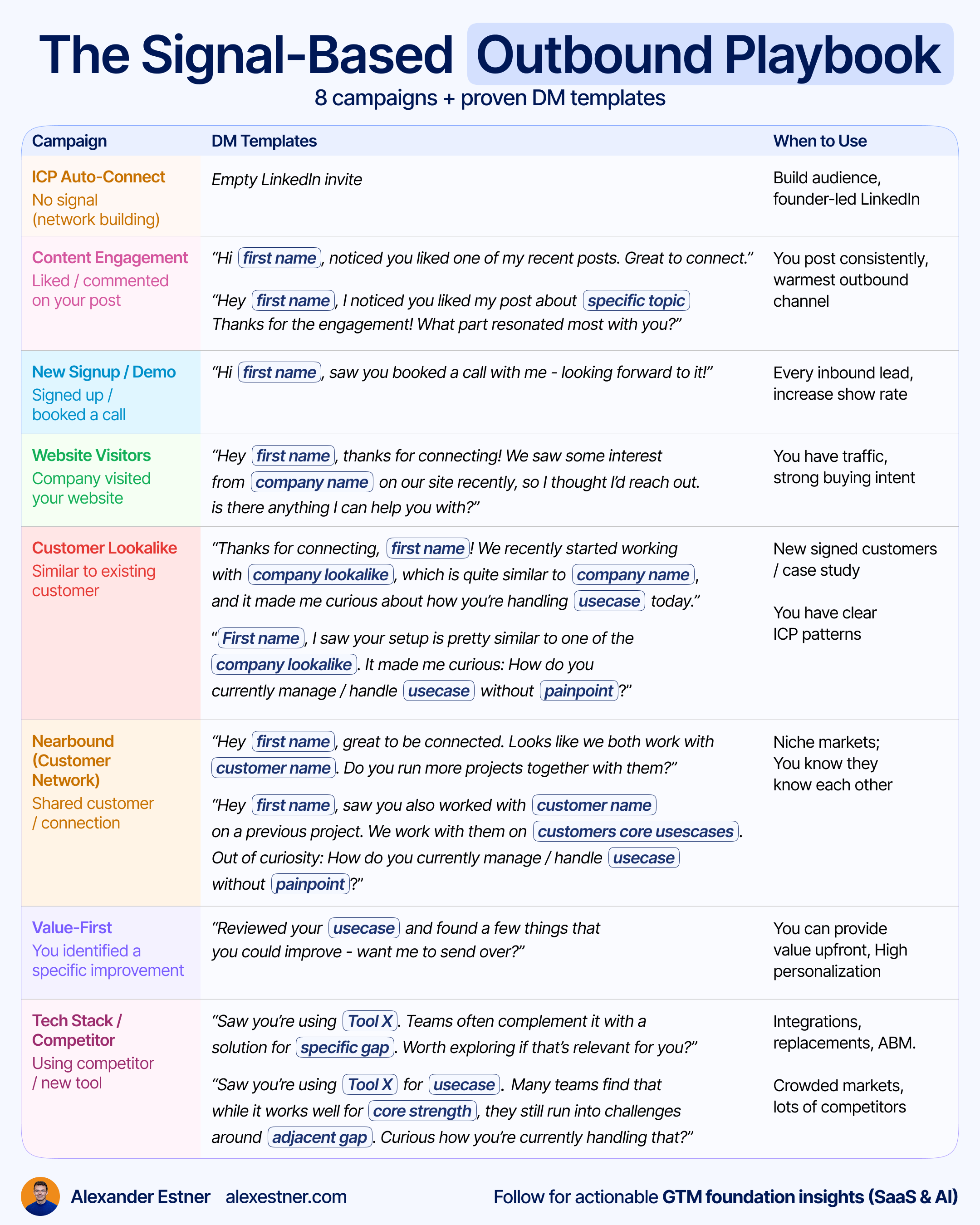
So today, we break down 8 outbound campaigns that book you meetings, without using hundreds of different tools.
ICP Auto-connect campaign
LinkedIn content engagement campaign
New signups/demos booked campaign
Website visitor campaign
Customer lookalike campaign
Customers’ network (nearbound) campaign
Specific tech tool campaign
Value first campaign
You can run all these campaigns with Lemlist.
A quick word from our sponsor
I only include sponsors that I would recommend personally. If you’re interested in reaching 28,000+ SaaS operators, sponsor the next newsletter.
📢 lemlist — The outbound platform that books meetings, not bounces

lemlist is the multichannel outbound platform built for sales teams who need real pipeline, not just activity metrics.
Connect intent signals, personalize at scale, and send sequences that actually get replies
Build email + LinkedIn sequences in minutes, with AI that sounds like you
Trigger outreach based on timing signals, not guesswork
Track every reply, click, and booked call in one dashboard
Want to make your direct motion work before you try to scale it?
4-Step System: Turn Insights into effective Outbound Campaigns
The two ingredients that make your outbound effective: Timing + Relevance
Right Timing + Relevance
This means we use a signal (that is relevant for the contact) to reach out. The most powerful buying signals are often very specific to your market.
So step 1 is:
Think about relevant triggers that are a proxy for your product that might be relevant to them.
When you track the right signal:
Your message becomes relevant to your contact.
And it comes at the right time.
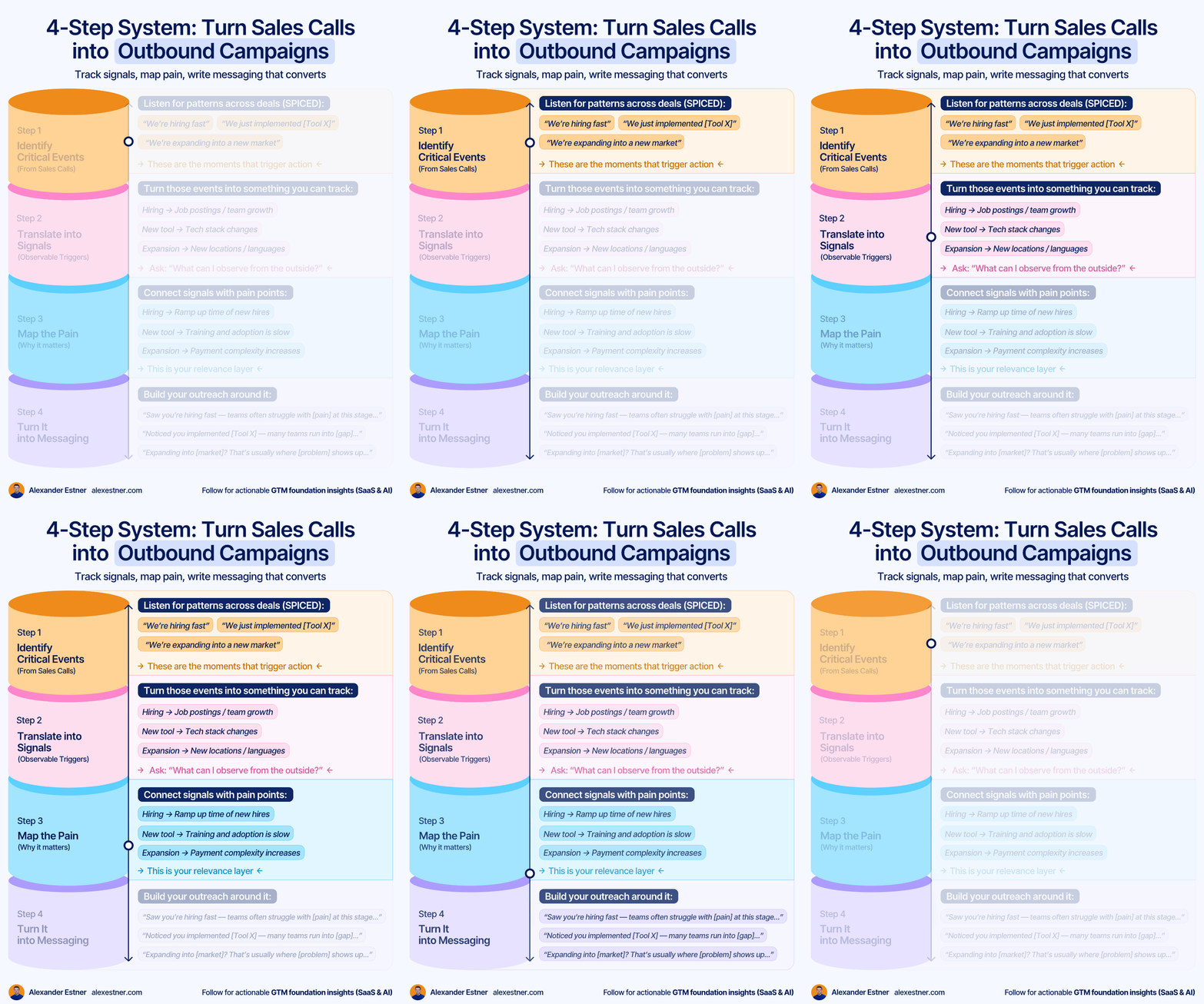
So let’s have a look at the 4 steps: Identify critical events, track signals, map pain, write messaging that converts.
Step 1: Identify Critical Events (From Sales Calls)
Listen for patterns that you hear in your sales calls. If you apply SPICED, watch out for the critical events mentioned:
“We’re hiring fast”
“We just implemented [Tool X]”
“We’re expanding into a new market”
Step 2: Translate into Signals (Observable Triggers)
Think about trackable signals for these events. Something that you can observe from the outside. A proxy that timing is right:
Hiring → Job postings / team growth
New tool → Tech stack changes
Expansion → New locations / languages
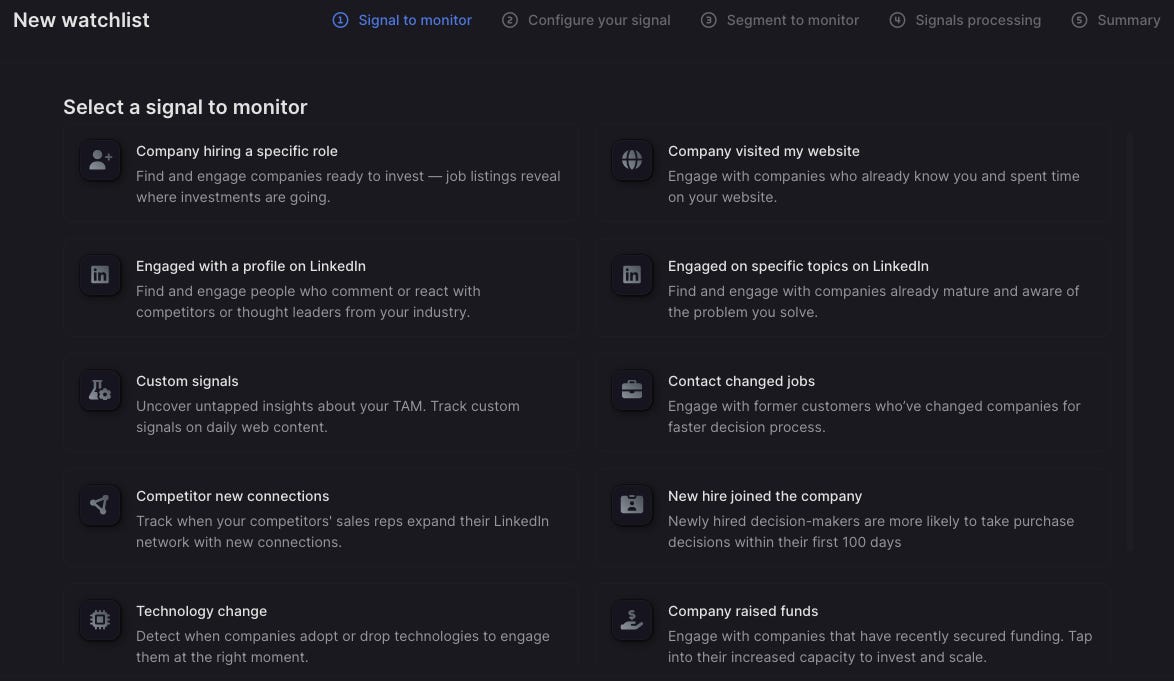
Here’s an overview of the signals that you can monitor with Lemlist, without using another tracking tool.
Step 3: Map the Pain (Why it matters)
This step is critical. Connect signals with related pain points:
Hiring → Long ramp-up time for new hires
New tool → Training and adoption are slow
Expansion → Payment complexity increases
👉 This makes your outreach relevant
Step 4: Turn It into Messaging
Now you connect the dots: Signal + Pain. Build your outreach around it:
“Saw you’re hiring fast — teams often struggle with [pain] at this stage…”
“Noticed you implemented [Tool X] — many teams run into [gap]…”
“Expanding into [market]? That’s usually where [problem] shows up…”
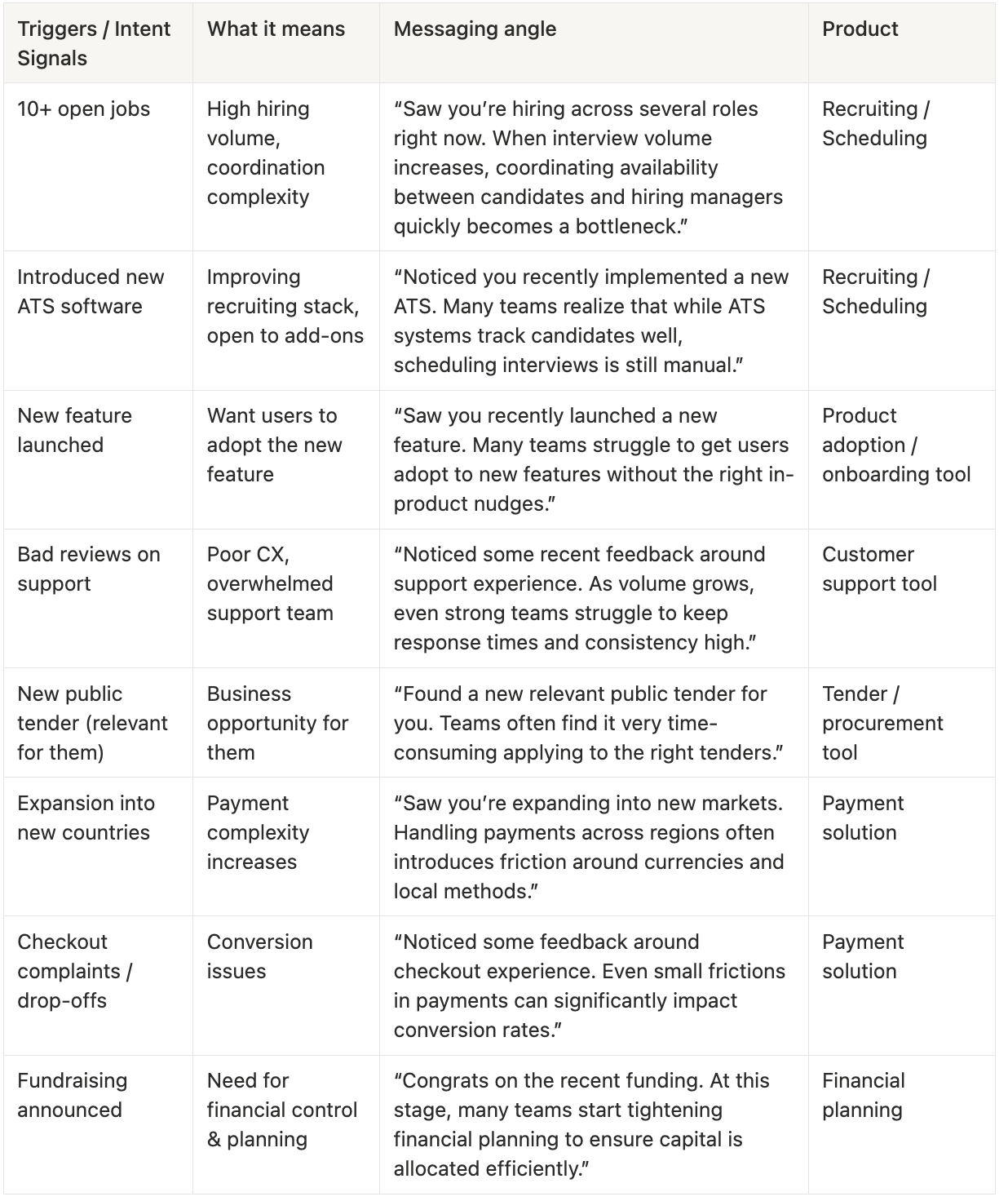
Signal-based messaging
Here are a few more examples of signal-based messaging.
So let’s have a look at the campaigns. 👇
Campaign 1: ICP Auto-connect
This one isn’t signal-based at all.
But it helps you build a relevant network on LinkedIn. Especially if you create content (Founder LinkedIn brand) and do (signal) based outreach via LinkedIn, it helps if you expand your network with ICP contacts.
You can connect with 100-200 contacts per week (depending on whether you are a free user or a premium/sales navigator user). Expect a 30% acceptance rate.
This means you add roughly 50 ICP contacts per week to your network - on autopilot.
Do this for 12 months, and you’ve added 2500+ ICP contacts to your network.
People who see your content will start to build trust and are more likely to engage with you when you reach out.
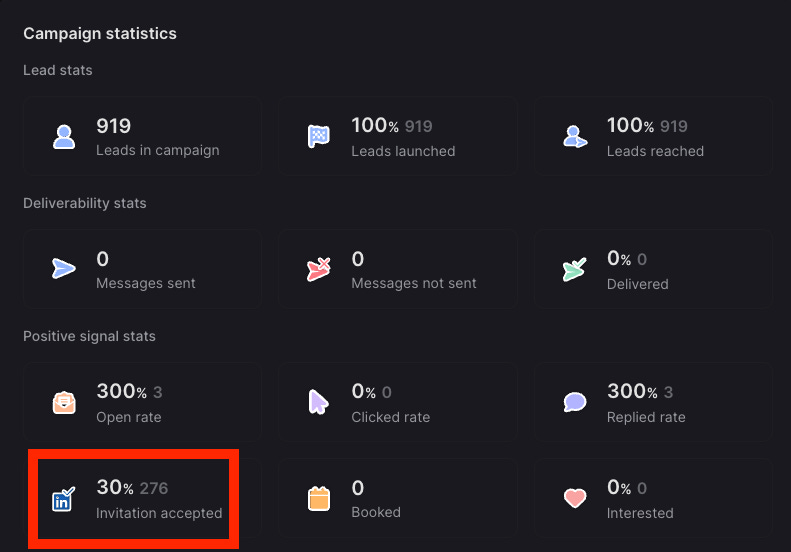
All you need to do is add the right ICP contacts to your Lemlist Auto Connect campaign.
You will have a few ways to add the contacts to the campaign:
Import from Sales Navigator
Adding contacts manually with the Lemlist Google Chrome extension
Use Lemlist native database
Push leads from third-party databases (Clay, Prospeo, Apollo)
Upload a CSV or Import from your CRM
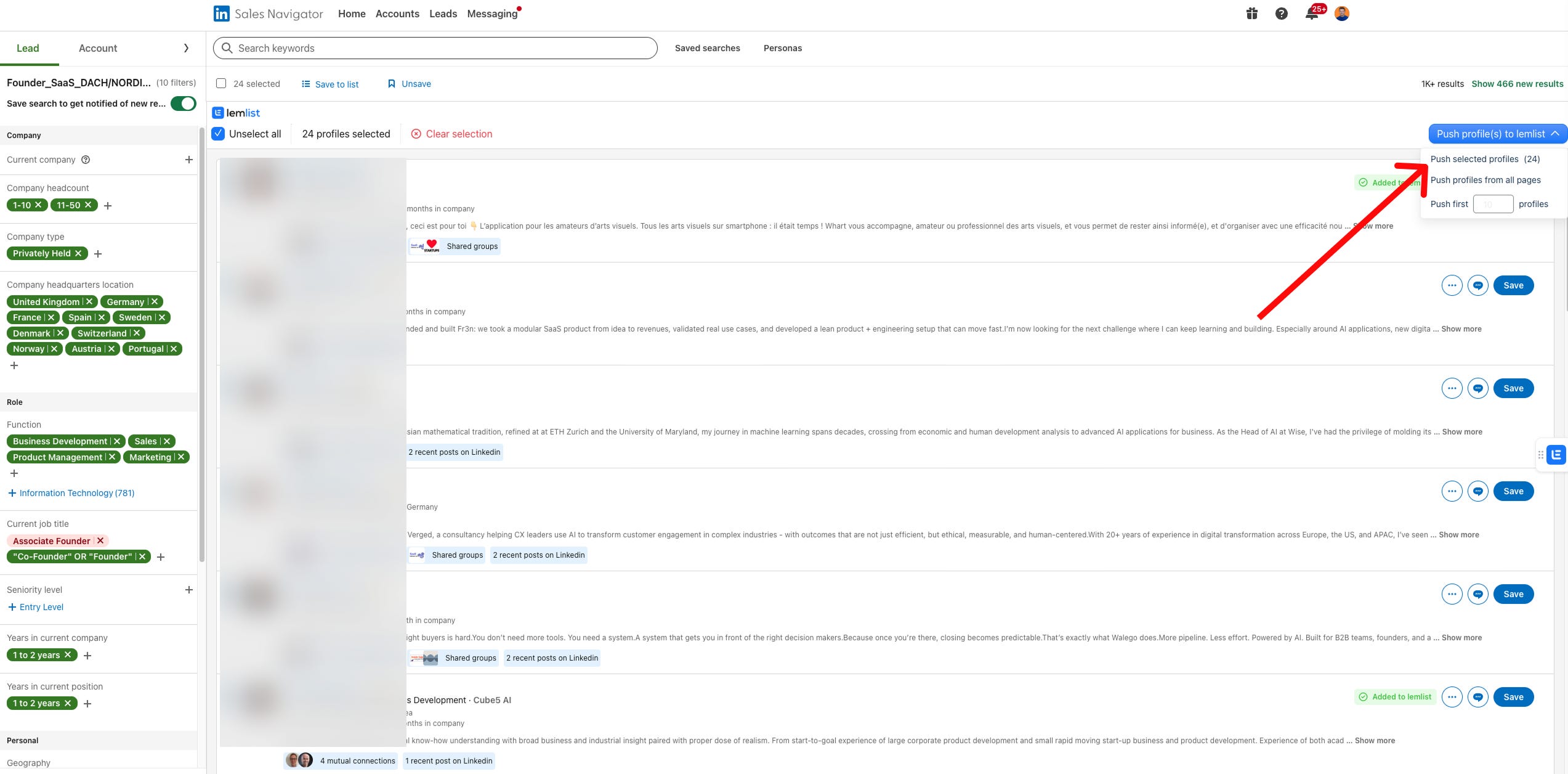
This first campaign fits perfectly with Campaign 2.
Campaign 2: Engaged with your LinkedIn content
Lemlist makes it easy to track people who engaged with your LinkedIn content.
To make sure you only get relevant signals, you can define:
What type of engagement counts as a signal (like, comment, both)
Add filter criteria (so you only get signals from your ICP)
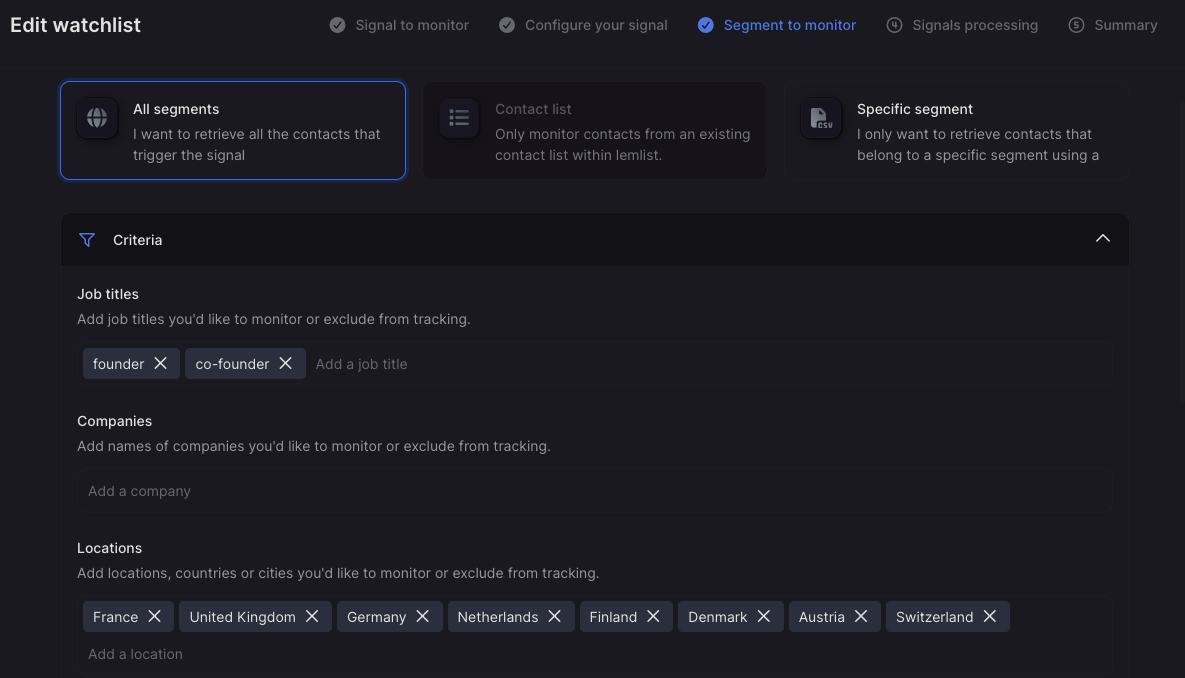
I started using it for myself a few weeks ago. You see, I get 2-3 ICP leads per day.
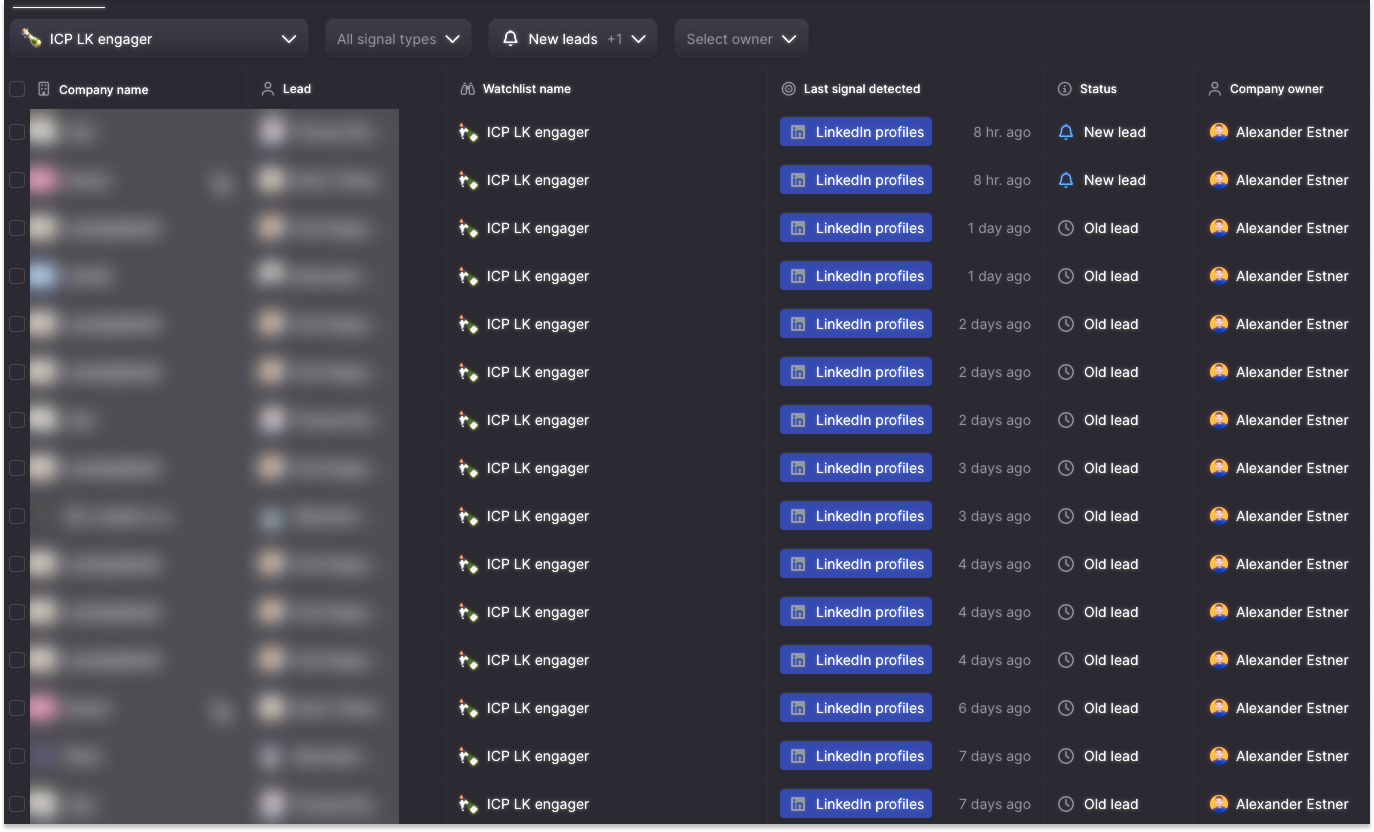
With one click, you can push them to the right campaign.
And the campaign itself doesn’t need to be super complex.
2 steps are all you need:
Step 1: LinkedIn connection
The message can be as simple as:
“Hi {{firstName}}, noticed you liked one of my recent posts.
Great to connect.”
Step 2: DM after they accepted the connection request
Don’t send straight after they accepted. Wait 1-2 days.
Initial response: Thank them specifically for engaging with your particular post
“Hey [Name], I noticed you liked my post about [specific topic]. Thanks for the engagement! What part resonated most with you?”
“Hey [Name], I liked your comment on my post about [topic]. Are you currently working on [relevant challenge or solution]?”
Value-add follow-up: Share additional relevant information
“Since you found that interesting, you might also enjoy this [resource/article] that dives deeper into [related topic].”
Relationship building: Ask about their experience with the challenge your content addresses
“I’m curious - have you been facing similar challenges with [problem your solution addresses] at [their company]?”
Direct Approach:
“Hey [Name], I noticed you’ve been engaging with content about [topic]. We’ve helped similar [company specifics] companies in [country/industry] to [usecase] - resulting in [positive results]. If this sounds interesting, I’d be happy to [soft value-first offer] - no strings attached.”
For advanced LinkedIn signals, consider a tool like Trigify.
Campaign 3: Connect with new Signups/Demos booked
Sounds obvious. Reality is that more than 50% of the founders I worked with did not do this.
So what is it about?
If you get a new sign-up for your product or a new inbound demo booked, make sure to send them a connection request on LinkedIn.

“Hi {{firstName}}, saw you booked a call with me — looking forward to it!”
Lemlist allows you to use webhooks and connect tools like zapier, n8n, claude, make to automatically push new leads to your Lemlist account.
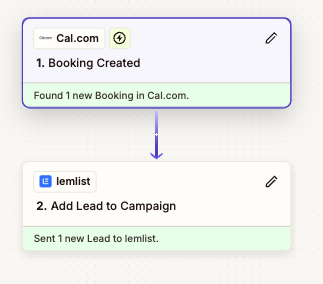
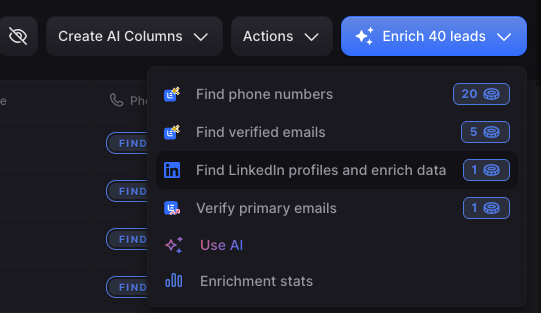
Once you have added the contacts to Lemlist, you can use their enrichment feature to find the LinkedIn profile based on their email address.
Campaign 4: Website visitors
Knowing that a company visited your website is a strong signal.
Lemlist currently enables company-level identification. Meaning you know that someone from the company visited your website.
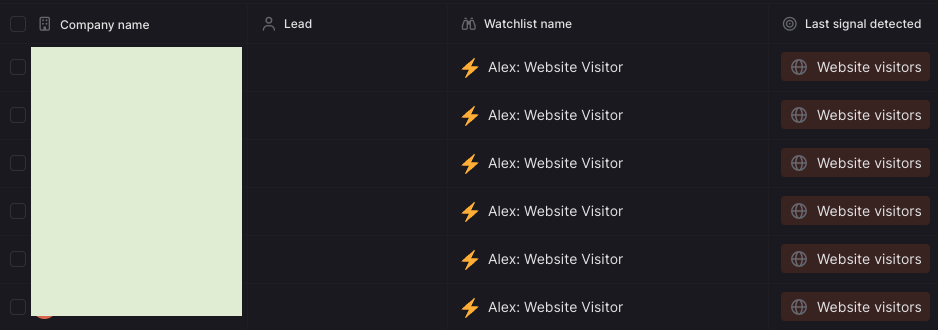
But with one click on the company, you see its contacts.
In case you want person-level identification, consider using a tool like Snitcher.
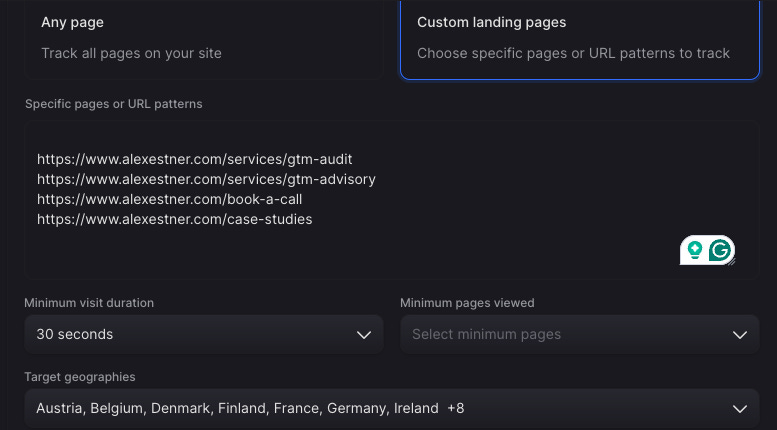
What’s great is that you can narrow down to specific pages and filter only for relevant target locations.
For me, I focus on Europe-based founders, and I care about people who’ve been on my GTM audit & GTM advisory page for longer than 30 seconds.
Here are some DM templates you can use:
“Hey {{first_name}}, thanks for connecting!
We saw some interest from {{company_name}} on our site recently, so I thought I’d reach out. Is there anything I can help you with?”
“Thanks for connecting, {{first_name}}! I noticed you or one of your team members from {{company_name}} recently visited our website.
Usually this means explore new ways for {{usecase}}.
Curious if that’s something that’s been top of mind for your team lately?”
Campaign 5: Customer Lookalike
Look for companies that are similar to your best-fit customers.
Thanks for connecting, {{first_name}}!
We recently started working with {{company_lookalike}}, which is quite similar to {{company_name}}, and it made me curious about how you’re handling {{usecase}} today.
Is that something you’re involved with on your side?
{{first_name}}, I saw your setup is pretty similar to the one of {{company_lookalike}}.
It made me curious: how do you currently manage/handle {{usecase}} without {{painpoint}} ?
To find the right lookalikes, you could test a tool like ocean.io or LGM lookalike feature - or manually find the right companies based on firmographic and technographic filters (based on your ICP criteria).
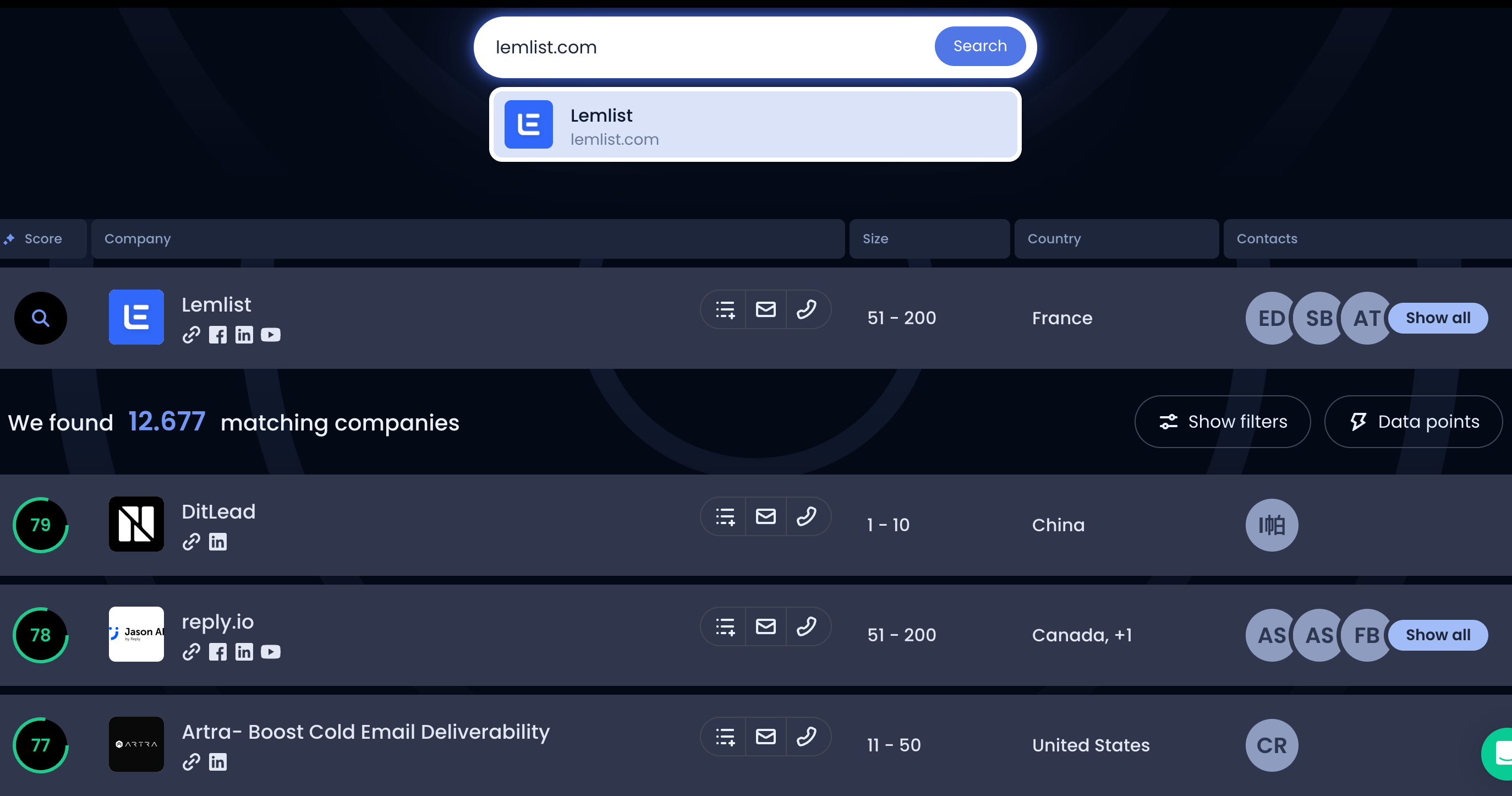
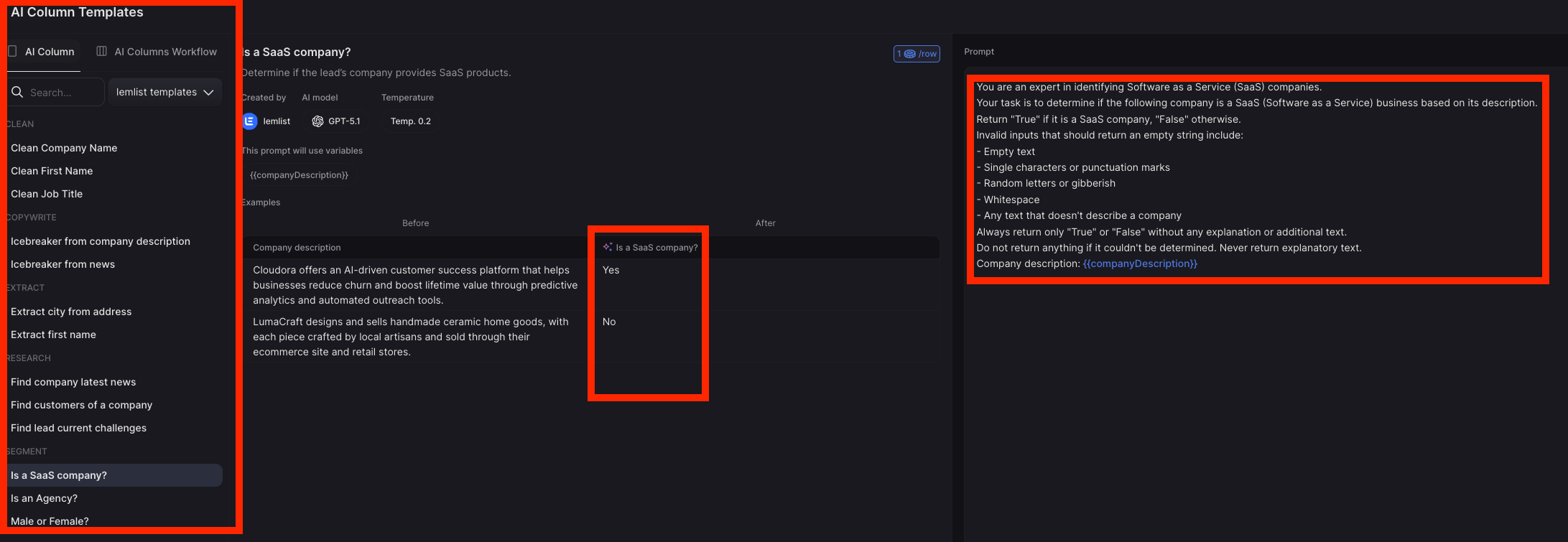
Depending on your exact set-up, this is also where Lemlist’s new AI agentic enrichment might be smart to use.
Here’s an example of how you can enrich your leads based on if they are a ‘SaaS company’.
Campaign 6: Customers’ network (Nearbound)
The approach is very similar to the customer lookalike campaign above.
The difference here is that we scan the network of your customer to find relevant ICP fits.
And you use their names as an ‘opener’.
Here are some ideas for you:
Search for companies that are located in the same area as your new customer
This can work great if you know that there is a high likelihood that they know each other.
Think about:
restaurants on the same street
Architecture firms in the same city
Logistic teams with hubs in the same industrial park
Municipal administrations with close Zip Codes
Now, when you reach out to those companies, you can leverage your existing customers’ names. They will recognize their name, which makes your message relevant to them.
Search your customers’ suppliers, customers, and partners who fit your ICP
Same strategy as above. Instead of the local relevancy, you use their existing relationship as a conversation opener.
Hey {{firstName}}, great to be connected.
Looks like we both work with {{Customer}}. Do you run more projects together with them?
Hey {{firstName}}, saw you also worked with {{Customer}} on a previous project.
We work with them on {{customers_core_usecases}}.
Out of curiosity: how do you currently manage/handle {{usecase}} without {{painpoint}} ?
Campaign 7: Value First Campaign
In case you can provide easy upfront value to your clients, that can be a great strategy.
There are 2 ways to perform this tactic:
You actually did create something relevant to them and share it upfront, or
You create on demand: you ask them if they are interested, and if they are, you create the content and share it with them
A few examples so you can better understand what I mean:
“Reviewed your product onboarding flow and found a few things that you could improve”
👉 If you offer a service/product that helps with onboarding
“Reviewed your LinkedIn profile and can share with you 4 things that would help you to stand out more”
👉 I received this actually 3x times in the last weeks, every time I responded. Why: Easy to say yes, low commitment.
“Saw your Google ads on keyword X - a few things that I observed…”
👉 If you offer a service/product that helps companies run better ads
“I found a few public tenders that might be relevant for you. Want me to share it with you?”
👉 If you offer a service/product that helps companies find relevant tenders.
“I’ve created a short 2-min video that shows you how you can improve your website visibility in LLMs - want me to send it over?”
👉 If you offer a service/product that helps companies to increase their AI visibility
“I really enjoy your content. I’ve turned your last newsletter episode into 5 LinkedIn posts that will increase your engagement on LK. Want me to share them with you?”
👉 If you offer a service/product that helps creators with content production
I’ve actually tested this approach for myself, and it works!
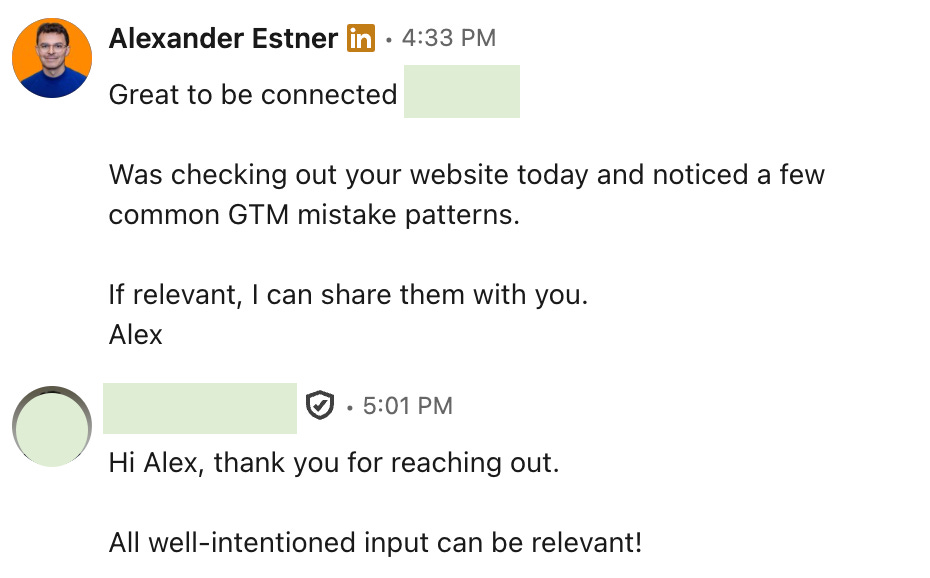
I think you get the pattern.
You offer free value with low commitment. Something easy to say Yes to.
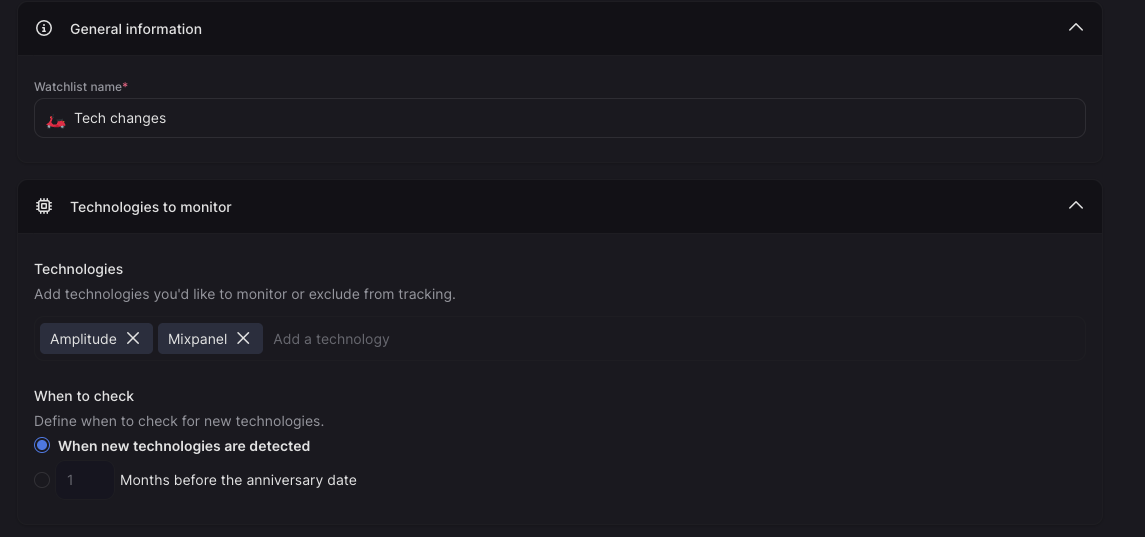
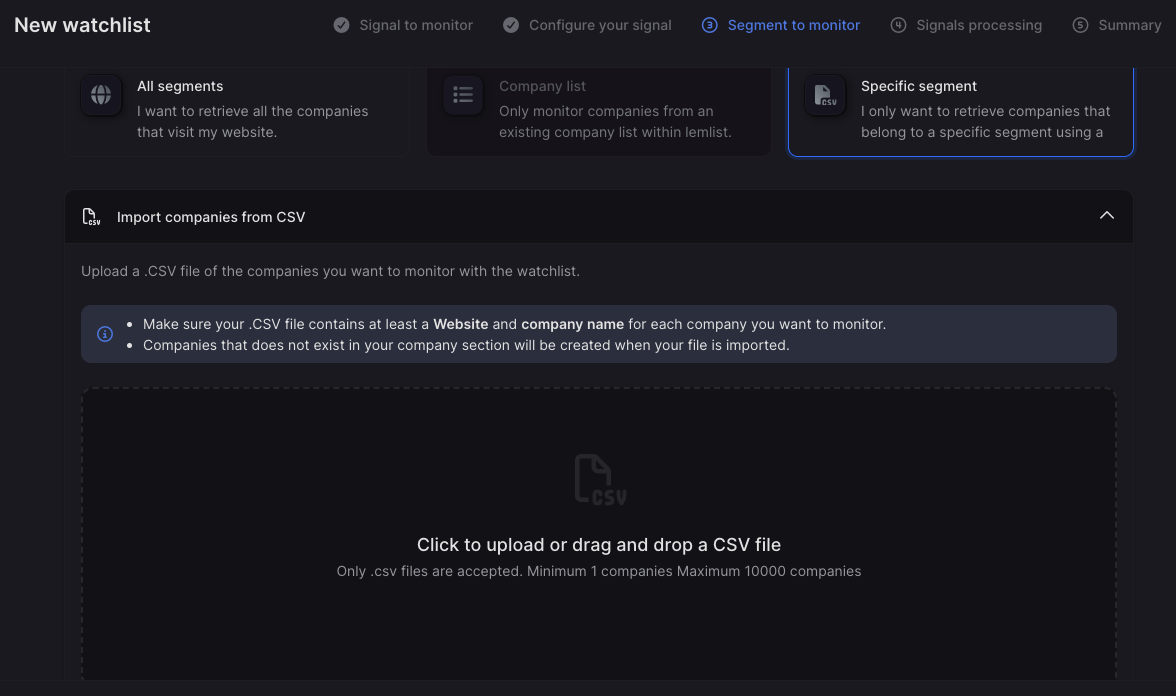
Campaign 8: Companies using a specific tech tool
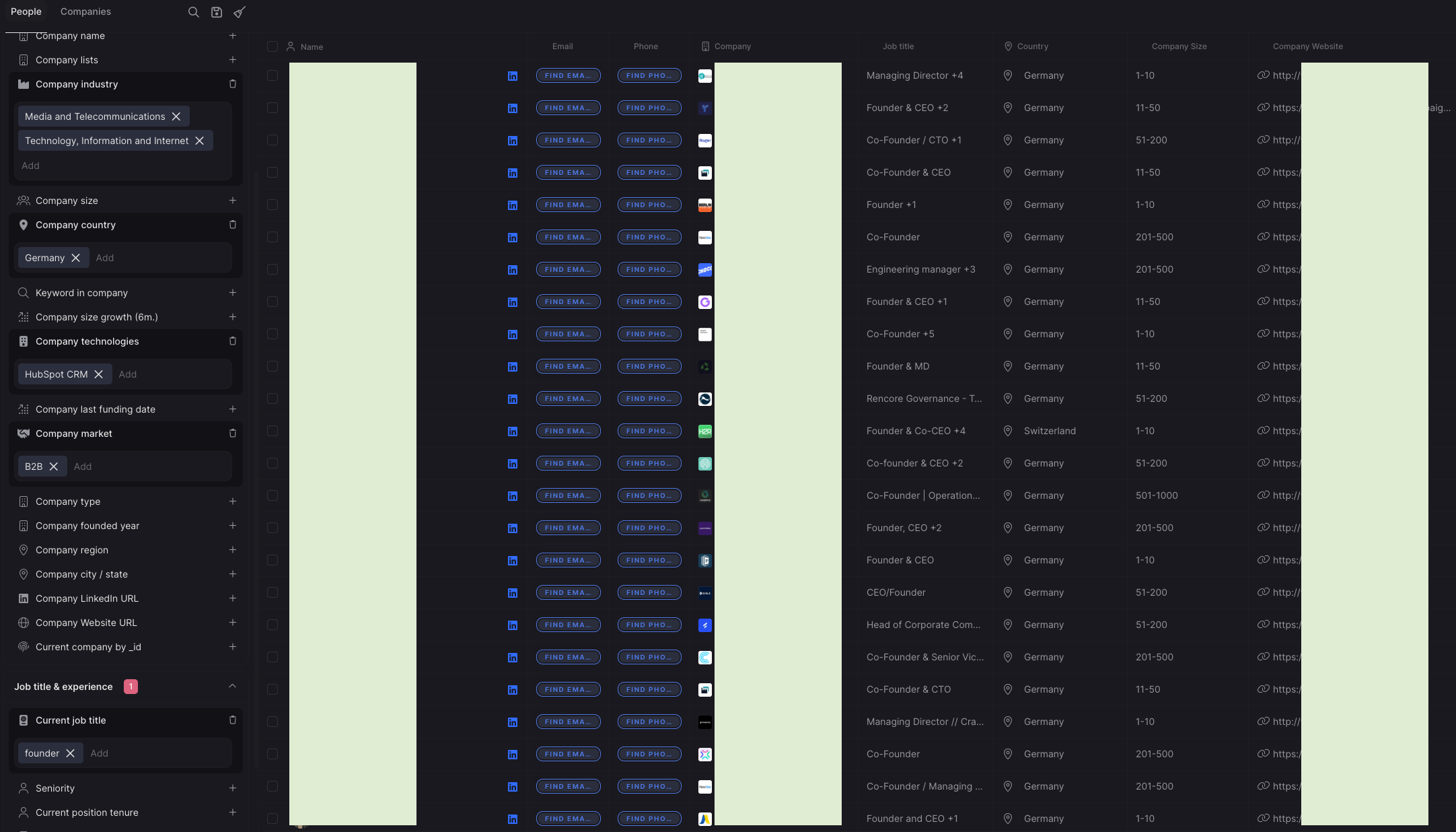
Knowing that a company is using a specific tool is a strong and actionable signal. It gives you immediate context and a natural way to start the conversation.
In practice, this signal is most useful in three scenarios:
1. You integrate with the tool (product partner)
Your product works on top of or alongside their existing tool.
→ Example: an analytics tool built on top of a CRM like HubSpot or Shopify.
2. You extend the tool
Your product fills a clear gap or missing capability.
→ You’re not replacing it — you’re making it more valuable.
3. You replace the tool (competitor)
Your product is a direct alternative.
→ You’re positioning against the limitations of their current solution.
Across all three cases, the key advantage is simple:
👉 You can use the tool they’re already using as a relevant, personalized icebreaker.
Campaign 8a: Company adopts a new tool
A particularly strong version of this signal is when a company has recently adopted a new tool.
This often indicates:
They are actively improving their stack
They are open to new solutions
They are still shaping their workflows
This is especially powerful if:
Your product integrates with that tool, or
You know your best customers typically use both tools together
Example:
If companies that adopt a product analytics tool often also need your solution, this becomes a high-intent trigger.
This works extremely well in ABM (Account-Based Marketing):
Define a target list of accounts
Track when they adopt relevant tools
Reach out at the right moment
Example message
“Saw you’re using [Tool X]. Teams often complement it with a solution for [specific gap]. Worth exploring if that’s relevant for you?”
Campaign 8b: Companies using a competitor
You can apply the same logic to competitor-based outreach.
Here, the goal is to:
Acknowledge what they’re using
Highlight common limitations
Open a conversation around gaps
Example message
“Saw you’re using [Tool X] for [use case]. Many teams find that while it works well for [core strength], they still run into challenges around [adjacent gap]. Curious how you’re currently handling that?”
So by now, you have at least 8 relevant campaigns to test yourself.
But there are 2 more things that I want to share with you:
Be intentional and specific about your CTAs
Track your outbound campaigns (and learn)
Specific CTAs
Even with perfect targeting and strong messaging, your outbound will fall flat if the CTA creates friction.

The goal of a great CTA isn’t to close a deal, it’s to earn the next small step.
Common CTA Mistakes
❌ Too much commitment
Asking for a 30-minute call upfront is a big ask — especially from someone who doesn’t know you yet. You haven’t earned that level of time.
❌ Low perceived value
“Let me show you our product” isn’t compelling. Buyers care about their problems, not your demo.
❌ Vague or unclear
“Let me know your thoughts” or “open to chat?” creates ambiguity. If it’s not clear what happens next, people won’t act.
❌ Too many options
Multiple CTAs in one message (“call, demo, webinar invite, share case study?”) create decision fatigue and lead to no decision at all.
If you get good response rates, but a low meeting booked rate, you know your CTA is off.
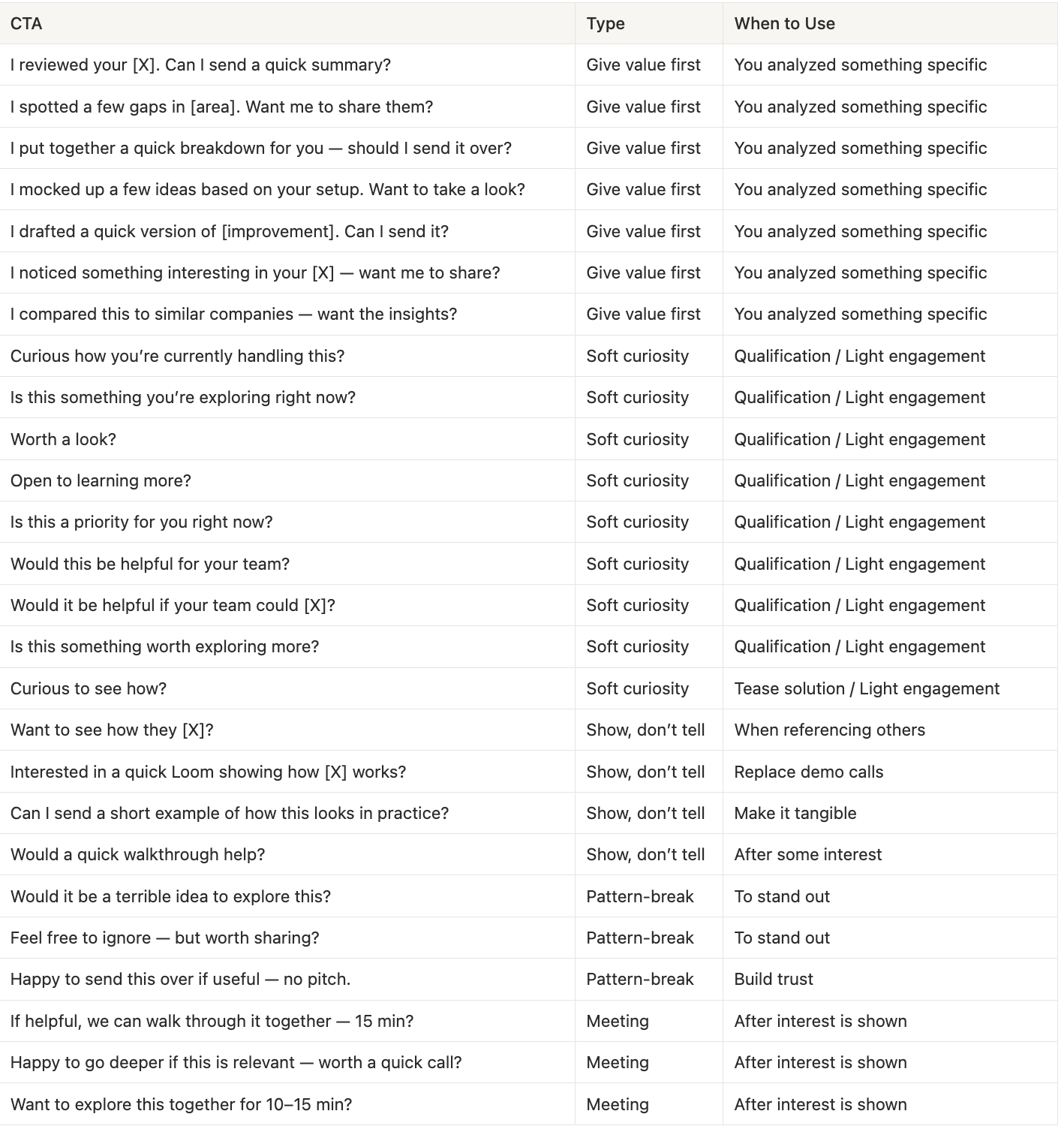
Strong outbound CTAs are:
Low friction → easy to say yes to
Clear → one simple next step
Value-led → tied to something relevant for them
Here are 25+ effective CTAs:
Outbound Success Metrics
Once you run your outbound campaigns, analyze your performance.
Key Metrics
Connection Acceptance Rate → Accepted ÷ Sent
Reply Rate → Contacts replied ÷ contacts messaged
Positive Reply Rate → Qualified/positive replies ÷ contacts messaged
Meeting booked rate → Meetings booked ÷ contacts messaged
Analyze your results:
Low LK acceptance rate → Optimize your profile; wrong leads
Low reply rate → Optimize your messaging; improve signal relevance
Good (positive) reply rate but low meeting booked rate → Optimize your CTAs
Takeaway
By now, you have 8 outbound campaigns you can start testing.
But if there’s one thing to take away, it’s this:
Outbound isn’t about sending more messages.
It’s about sending them at the right moment. That’s what signals give you.
Start asking:
👉 “What happened that makes this the right time to reach out?”
Answer that and your outbound will feel completely different.
See you in 2 weeks.
3 ways I help founders build a strong GTM foundation 👇
If you’re somewhere between €0 → €1M ARR, I can help you with your GTM.
1️⃣ Free GTM Foundation Library
→ 50+ resources (guides, templates, frameworks)
2️⃣ GTM Audit
→ 360° assessment + 6-month action plan: Your GTM Blindspots revealed
3️⃣ 1:1 GTM Advisory
→ Work directly with me to build your GTM
honestly the whole 8-campaign breakdown is gold but that opening line is the one founders need to hear first